
Position Data Tiers
Not every ULog file contains the same position data. Some logs have authoritative home position. Some have only GPS-derived references. Some have nothing geographic at all. Hawkeye categorizes each log into one of three tiers based on what it finds.
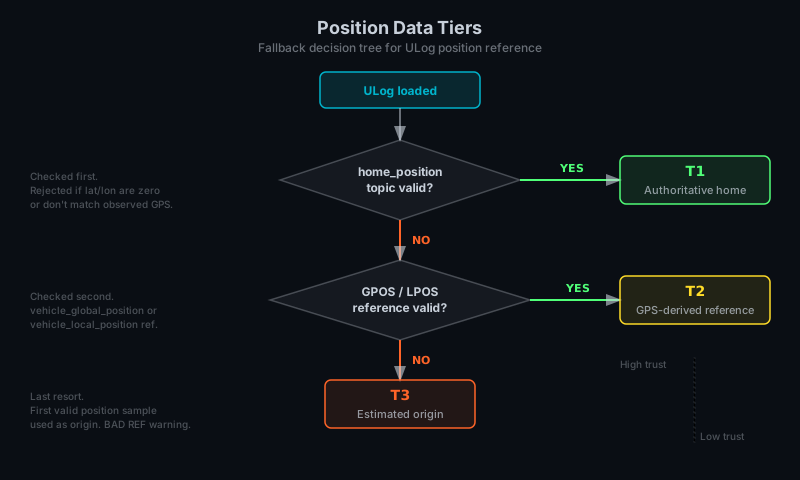
| Tier | Source | Trust level | Typical use |
|---|---|---|---|
| T1 | home_position topic | High (authoritative) | PX4 logs with clean home set before arming |
| T2 | vehicle_global_position or vehicle_local_position reference | Medium | Logs where home was set mid-flight or derived from GPS |
| T3 | Estimated origin (first valid position sample) | Low | Logs missing both home and GPS (indoor flights, optical flow, etc.) |
How to check the current tier
The tier badge is visible in two places:
- HUD tier indicator, a small T1/T2/T3 badge in the Console HUD, colored per tier
- Debug overlay, an explicit tier label with full description, shown when
Ctrl+Dis active
What each tier means for multi-drone replay
- T1 logs compare reliably, because all drones share a well-defined geographic reference.
- T2 logs compare if the reference points align; if they drift, positions drift too.
- T3 logs have no real geographic position. Multi-drone replay with mixed tiers produces ambiguous layouts. Use the Narrow Grid deconfliction mode to collapse T3 drones into a shared view.
Known gotchas
- Zeroed home position: some logs record a
home_positiontopic with zeros for lat/lon/alt. Hawkeye treats this as invalid and falls back to T2. - Home rejected: if the pre-scan determines that the recorded home position doesn't match observed GPS data, it's rejected and the log falls through to T2. This prevents bad home values from rendering drones at
(0,0,0)or far from the expected area. - BAD REF warning: shown in the debug overlay if the current reference frame is suspect. Usually appears alongside T3 when the estimated origin drifts from observed position data.
Related
- Data Sources — Which MAVLink messages and ULog topics feed the tier decision
- Multi-Drone Replay — Deconfliction modes for mixed-tier logs